Design · Beginner
Master 3D garment construction in Clo3D
Transition from 2D patterns to 3D prototypes. Learn to import patterns, simulate fabrics, and detect fitting defects before cutting fabric.
- 55 video lessons
- 5 homework assignments
- Final course project
- Personal tutor feedback
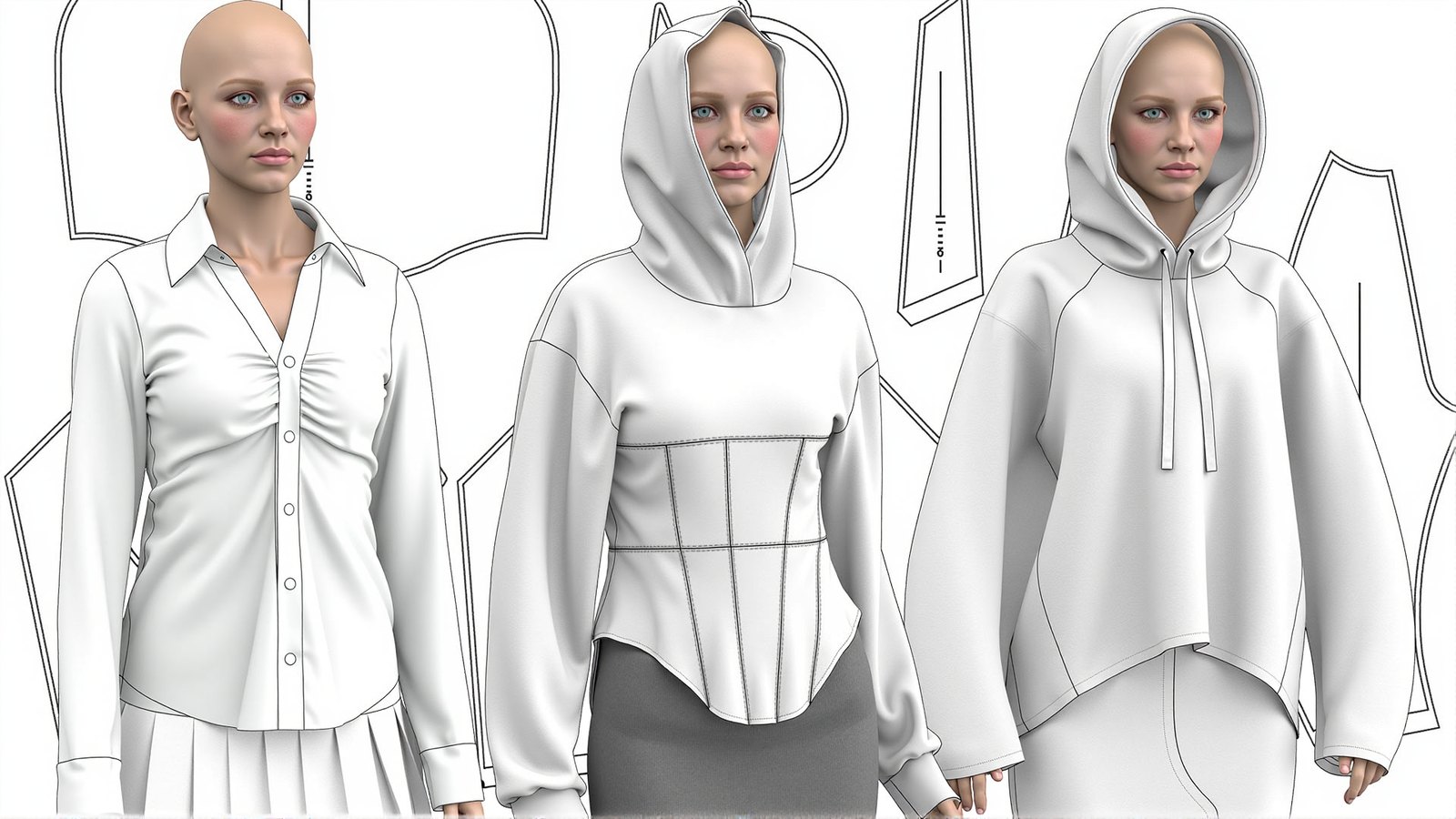
Bridge the gap between 2D patterns and 3D reality
Traditional pattern making often involves a cycle of trial and error: drafting a pattern, cutting fabric, sewing a sample, and then discovering that the fit is wrong. This process is time-consuming and expensive. As the fashion industry shifts towards digital workflows, the ability to visualize and test designs in 3D is no longer a luxury—it is a essential skill.
This course is designed for pattern makers, designers, and fashion students who want to integrate Clo3D into their professional toolkit. You will learn how to import existing patterns, set up realistic avatars, and understand the physics of fabric simulation. The goal is to help you create accurate digital prototypes that reflect how a garment will behave on a real body.
We focus on practical application. Instead of just learning which buttons to click, you will understand the logic behind 3D construction. By the end of the programme, you will be able to identify constructive defects in the digital environment, saving time and resources in your physical production process.
What you will be able to do
Upon completion of the course, you will possess these key skills:
- Import patterns from CAD software
Seamlessly bring DXF, AAMA, and ASTM files from other systems into Clo3D.
- Digitize paper patterns
Convert traditional paper drafts into digital 3D patterns efficiently.
- Configure realistic avatars
Adjust avatar proportions to match specific body types for accurate fitting.
- Simulate fabric physics
Set material properties to mimic the drape and weight of real textiles.
- Detect fitting defects
Identify tension issues, wrinkles, and balance errors in the 3D view.
- Create size ranges
Generate graded patterns and arrange them for production readiness.
- Visualize design concepts
Render photorealistic images of garments for portfolios or presentations.
- Optimize digital workflows
Reduce the need for physical samples by validating designs digitally.
- 55
- Video lessons
- 5
- Homework assignments
- 1
- Final course project
- 86%
- Completion rate
The method: From flat sketches to 3D precision
Many beginners struggle with Clo3D because they treat it like a drawing tool rather than a simulation engine. Our curriculum breaks down the software's algorithms so you understand how the 3D engine interprets your 2D patterns.
We start with the fundamentals of the interface and pattern creation. Then, we move to the critical step of sewing and simulation. You will learn how to troubleshoot common issues like exploding garments or unnatural draping by adjusting physics settings and seam allowances.
The course emphasizes a structured approach. You will not just build a garment; you will build a digital workflow. This ensures that your final 3D model is not just a pretty picture, but a technically accurate representation of a producible item.
- Step-by-step pattern import
- Avatar customization techniques
- Fabric property calibration
- Defect analysis and correction

How the course works
The learning process is structured as a self-paced journey with guided milestones. You gain immediate access to the first module upon enrollment. The course uses a 'stop-lesson' system: access to the next block of lessons opens only after you submit your homework for the previous module. This ensures you master each skill before moving on.
Feedback is a core component of the programme. After submitting your assignments, you receive personal video or text feedback from the tutor. This direct interaction allows you to clarify doubts and correct mistakes in real-time, mimicking the experience of a classroom setting but with the flexibility of remote learning.
All lessons are recorded and available for unlimited viewing during your access period. This allows you to revisit complex topics, such as fabric simulation settings, as many times as needed until you feel confident.
The programme
This comprehensive curriculum covers the entire Clo3D workflow for pattern makers.
1Module 1: Interface and BasicsGetting started with Clo3D and understanding the workspace.8 lessons
- Navigating the 2D and 3D windows
- Setting up your first project
- Creating basic patterns from scratch
- Understanding points, lines, and curves
- Introduction to the toolbar and menus
2Module 2: Pattern Import and DigitizationBringing existing patterns into the digital environment.10 lessons
- Importing DXF and AAMA files
- Digitizing paper patterns using the pen tool
- Cleaning up imported vector data
- Labeling patterns and adding notches
- Organizing pattern pieces for sewing
3Module 3: Avatars and Body TypesConfiguring the digital mannequin for accurate fitting.7 lessons
- Selecting and loading standard avatars
- Adjusting body measurements manually
- Importing custom avatar data
- Understanding pose and movement settings
- Matching garment size to avatar size
4Module 4: Sewing and SimulationConnecting pattern pieces and simulating the garment.12 lessons
- Creating sewn seams and edges
- Setting seam allowances and properties
- Running your first simulation
- Troubleshooting common simulation errors
- Adjusting tension and compression
5Module 5: Fabric Physics and MaterialsMaking garments look and behave like real textiles.10 lessons
- Understanding the fabric library
- Editing physical properties of materials
- Creating custom fabric presets
- Applying textures and prints
- Simulating heavy vs. light fabrics
6Module 6: Defect Analysis and CorrectionIdentifying and fixing fitting issues in 3D.8 lessons
- Reading the 2D stress map
- Identifying drag lines and wrinkles
- Adjusting pattern shape to fix fit
- Balancing the garment on the body
- Checking range of motion
7Module 7: Grading and LayoutPreparing patterns for production.6 lessons
- Setting up size ranges
- Automatic and manual grading
- Creating marker layouts
- Exporting graded patterns
- Finalizing the digital tech pack
What you get
Your enrollment includes everything needed to succeed:
- 55 HD Video Lessons
Clear, step-by-step tutorials covering all aspects of Clo3D.
- 5 Practical Homeworks
Assignments designed to reinforce each module's key concepts.
- Final Course Project
A comprehensive assignment to build a complete garment from start to finish.
- Personal Tutor Feedback
Detailed video or text reviews of your submitted work.
- Lifetime Access
Keep your access to the course materials indefinitely.
- Community Support
Access to a dedicated chat for questions and peer interaction.
Is this course for you?
This course is for you if…
- Pattern makers transitioning from 2D to 3D workflows
- Fashion designers who want to visualize concepts faster
- Students studying fashion technology or design
- Professionals looking to reduce physical sampling costs
Probably not a fit if…
- Those seeking only basic photo editing skills
- Individuals without a computer meeting Clo3D system requirements
- People looking for a career guarantee or job placement service
- Those who prefer purely theoretical lectures without practical software work
After the course
Upon completion, you will have a robust portfolio piece demonstrating your ability to create a garment from pattern import to final simulation. You will possess the confidence to tackle complex fitting issues digitally, a skill highly valued in modern fashion houses.
You will be able to integrate Clo3D into your daily workflow, reducing the time spent on physical samples and improving the accuracy of your initial drafts. This digital proficiency positions you as a modern, efficient specialist in the competitive fashion market.
The skills learned are transferable to various roles, from technical design to 3D visualization. You will have a solid foundation to explore advanced topics, such as digital marketing materials or virtual fashion shows, in future projects.
Frequently Asked Questions
How much time should I dedicate per week?
We recommend dedicating 4–6 hours per week to watch lessons and complete assignments. The course is self-paced, so you can adjust the speed to fit your schedule.
Do I need prior experience with Clo3D?
No, this course is designed for beginners. We start from the basics of the interface and assume no prior knowledge of the software.
What are the computer requirements?
You need a computer capable of running Clo3D. Recommended specs include a dedicated graphics card, at least 8GB of RAM (16GB preferred), and a modern operating system (Windows 10/11 or macOS).
How do I access the course after payment?
Immediately after payment, you will receive login credentials for the learning platform via email. You can access the lessons from any device with an internet connection.
What is the refund policy?
We offer a 14-day money-back guarantee. If you are not satisfied with the course within the first 14 days, you can request a full refund.
Can I get a job after this course?
While we do not guarantee employment, the skills taught are in high demand. Many graduates use their portfolio projects to apply for positions in 3D fashion design and technical design.
How long do I have access to the materials?
You have lifetime access to the course materials, including any future updates to the lessons, allowing you to revisit topics whenever needed.
What if I miss a deadline?
There are no strict deadlines. The course is self-paced, so you can submit your homework whenever you are ready. Feedback will be provided once you submit.
Start your digital fashion journey
Join the course today and transform your design process with Clo3D.